Best Travel Keyboards and Mice for Remote Work in 2026


Using a laptop stand without an external keyboard defeats the purpose. Your screen rises to eye level—great—but now you're reaching up awkwardly to type. The ergonomic solution requires both: stand plus keyboard.
For digital nomads, this means finding a keyboard and mouse that travel well. Small enough to pack without thinking. Reliable enough to trust for critical work. Comfortable enough for full work days.
After testing keyboards and mice across years of nomadic work, these are the combinations that actually deliver.
For a complete overview of building your mobile workstation, see our complete remote work setup guide.
Quick Navigation:
- Why External Peripherals Matter
- What to Look For
- The Best Travel Keyboards
- The Best Travel Mice
- Recommended Combinations
- FAQ
Why External Peripherals Matter
When you elevate your laptop screen with a portable laptop stand, you solve the neck strain problem. But you create a new one: the built-in keyboard is now positioned for gorilla arms.
The ergonomic setup requires:
- Screen at eye level (solved by stand)
- Keyboard at elbow height (requires external keyboard)
- Mouse at natural arm position (requires external mouse)
Beyond ergonomics, external peripherals offer:
- Better typing feel: Dedicated keyboards often type better than laptop keyboards
- Multi-device workflow: Switch between laptop, tablet, and phone without re-pairing
- Backup input: If your laptop keyboard fails, you can still work
- Flexibility: Position keyboard and screen independently for your comfort
The combined weight of keyboard + mouse adds under 1.5 lbs to your pack—a small price for a complete workstation anywhere.
What to Look For
Keyboard Considerations
Size and Weight Travel keyboards sacrifice some keys for portability. Options include:
- Full-size: All keys, rarely portable enough
- Tenkeyless (TKL): No numpad, still substantial
- 65-75%: No numpad or function row, good balance
- 60% or smaller: Ultra-compact, learning curve for missing keys
For most nomads, 65-75% layouts provide the best balance.
Connectivity
- Bluetooth: No dongle needed, works with any device
- USB receiver: More reliable connection, requires USB port
- USB-C wired: Zero latency, no charging, but tethered
Multi-device Bluetooth with easy switching (like Logitech's Easy-Switch) is ideal for nomads.
Key Feel
- Membrane: Quiet, flat keys, lighter weight
- Scissor: Low-profile, MacBook-like feel
- Mechanical: Tactile feedback, heavier, some switches are loud
Membrane and scissor keyboards are typically more travel-friendly.
Battery Life
- Replaceable batteries: No charging required, easy to replace anywhere
- Rechargeable: USB-C charging, must remember to charge
- Backlit impact: Backlighting dramatically reduces battery life
Mouse Considerations
Size and Shape Travel mice prioritize portability over ergonomics. Options include:
- Full-size ergonomic: Comfortable but bulky
- Compact: Good balance for most
- Ultra-slim: Maximum portability, less comfortable for long sessions
Sensor Quality Premium mice track on any surface—glass, granite, textured desks. Cheap mice fail on anything but mouse pads. For café work, surface-independent tracking is essential.
Silent Clicks Loud click sounds annoy café neighbors and coworkers. Most premium travel mice now offer silent switches.
Battery Life Most travel mice last months on a charge. Quick-charge features (1 minute = hours of use) eliminate charging anxiety.
The Best Travel Keyboards
Logitech K380 - Best Overall
The K380 has earned its reputation as the default nomad keyboard. The compact size and 14 oz weight disappear into any bag. Multi-device switching (three devices, dedicated buttons) handles laptop/tablet/phone workflows seamlessly. And battery life—up to 2 years on two AAA batteries—means you'll forget charging exists.
Key specs:
- Weight: 14 oz (400g)
- Keys: 79 (compact layout)
- Connection: Bluetooth (3 devices)
- Battery: 2x AAA, up to 2 years
The circular keys look unusual but type comfortably after brief adjustment. Not ideal for heavy typing (gaming, coding marathons), but perfect for standard work.
Best for: Most digital nomads seeking reliable, compact, long-lasting performance.
Logitech MX Keys Mini - Premium Compact
The MX Keys Mini commands a premium but delivers premium feel. The low-profile keys provide satisfying feedback without the noise of mechanical switches. Backlighting adjusts automatically to ambient light. USB-C charging delivers 10 days per charge (5 months without backlight).
Key specs:
- Weight: 17.5 oz (500g)
- Keys: 79 (compact layout)
- Connection: Bluetooth + USB receiver (3 devices)
- Battery: Rechargeable, 10 days (backlit) to 5 months
Smart Functions row adapts to your active application—media controls in Spotify, formatting in Word. The typing feel approaches quality desktop keyboards.
Best for: Writers, professionals who type extensively and want premium feel.
Apple Magic Keyboard - Mac Ecosystem
For MacBook users committed to the Apple ecosystem, the Magic Keyboard provides unmatched integration. Touch ID works on compatible Macs for quick authentication—a genuine time-saver. The scissor keys match MacBook feel exactly, eliminating adjustment periods.
Key specs:
- Weight: 8.7 oz (245g) without numpad
- Keys: 78 (compact layout)
- Connection: Bluetooth (Lightning charging)
- Battery: Rechargeable, ~1 month
The Lightning charging port feels dated in a USB-C world, and it only works with Apple devices. But for all-Mac users, the ecosystem integration is unbeatable.
Best for: MacBook users who value seamless integration over universal compatibility.
Keychron K3 - Mechanical Option
Mechanical keyboard enthusiasts don't have to abandon their switches while traveling. The K3's ultra-slim profile packs genuine low-profile Gateron switches into a 12.5mm thin body. Choose from red (linear), blue (clicky), or brown (tactile) switches for your preferred feel.
Key specs:
- Weight: 14.8 oz (420g)
- Keys: 84 (75% layout)
- Connection: Bluetooth (3 devices) + USB-C
- Battery: Rechargeable, up to 34 hours (RGB off)
RGB backlighting adds customization for those who want it. The aluminum frame adds premium feel without excessive weight. Note: even "quiet" mechanical switches are louder than membrane alternatives.
Best for: Mechanical keyboard enthusiasts who won't compromise on switch feel.
The Best Travel Mice
Logitech MX Anywhere 3S - Premium Choice
The MX Anywhere 3S is purpose-built for mobile work. The 8K DPI sensor tracks on any surface—I've used it on glass tables, granite countertops, even fabric armrests. Quiet clicks won't disturb café neighbors. USB-C quick charging gives 3 hours of use from just 1 minute of charging.
Key specs:
- Weight: 3.5 oz (99g)
- Sensor: 8K DPI, tracks on any surface
- Connection: Bluetooth (3 devices) + USB receiver
- Battery: Rechargeable, 70 days per charge
The MagSpeed electromagnetic scroll wheel handles both precision scrolling and rapid 1,000-line-per-second flying through documents. Side buttons are customizable for your workflow.
Best for: Power users who need reliable performance on any surface.
Logitech Pebble 2 - Best Value
The Pebble 2 delivers 80% of premium mouse performance at one-third the price. Silent clicks, three-device switching, and a compact profile that slides into any pocket. The AA battery lasts up to 24 months.
Key specs:
- Weight: 2.9 oz (82g)
- Sensor: 4K DPI
- Connection: Bluetooth (3 devices) + USB receiver
- Battery: 1x AA, up to 24 months
The sensor works on most surfaces but may struggle on glass. The slim profile is less ergonomic than curved mice for long sessions. For the price, though, it's exceptional.
Best for: Budget-conscious nomads who need a reliable, portable mouse.
Apple Magic Trackpad - MacBook Users
Some MacBook users prefer gestures to mice. The Magic Trackpad brings the full MacBook trackpad experience to any desk. Force Touch, gesture support, and the expansive glass surface feel identical to built-in trackpads.
Key specs:
- Weight: 8 oz (230g)
- Connection: Bluetooth (Lightning charging)
- Battery: Rechargeable, ~2 months
The larger footprint and higher weight make it less portable than mice. But if gestures are integral to your workflow, nothing else replicates the experience.
Best for: MacBook users who rely heavily on trackpad gestures.
Recommended Combinations
Budget Setup (~$60)
- Keyboard: Logitech K380 ($35)
- Mouse: Logitech Pebble 2 ($25)
- Total weight: 17 oz
Reliable, portable, and affordable. Perfect for testing whether external peripherals fit your workflow.
Best Value (~$105)
- Keyboard: Logitech K380 ($35)
- Mouse: Logitech MX Anywhere 3S ($70)
- Total weight: 17.5 oz
The K380 handles keyboards duties well; the MX Anywhere 3S provides premium mouse performance where it matters most (surface tracking, quiet clicks, quick charge).
Premium Setup (~$160)
- Keyboard: Logitech MX Keys Mini ($90)
- Mouse: Logitech MX Anywhere 3S ($70)
- Total weight: 21 oz
Both premium peripherals with matched features—multi-device switching, USB-C charging, quiet operation. The best typing and mousing experience you can pack.
Mac-Focused (~$170)
- Keyboard: Apple Magic Keyboard ($94)
- Mouse/Trackpad: Magic Trackpad ($129) or MX Anywhere 3S ($70)
- Total weight: 17-17.5 oz
Seamless integration for all-Apple users. Touch ID and gesture support enhance MacBook workflows.
FAQ
Do I really need both a keyboard and mouse?
For proper ergonomics with a laptop stand, yes. You could theoretically use the laptop keyboard and only add a mouse, but you lose the ergonomic benefits of the elevated screen. The keyboard + stand combination is what enables eye-level viewing.
Wireless or wired?
Wireless (Bluetooth) for travel. No dongles to lose, no cables to tangle, works with any device. The only advantage of wired is zero latency, which matters for gaming but not for work.
How do I carry them?
Most nomads toss their keyboard and mouse in their daypack's main compartment or a dedicated tech pouch. Neither needs special protection beyond avoiding crushing. Keyboard sleeves exist but add bulk for minimal benefit.
Will mechanical keyboards annoy café neighbors?
Generally yes, even "quiet" switches are louder than membrane keyboards. For shared spaces, membrane or scissor-switch keyboards are more considerate. Save the mechanical keyboard for private rooms or coworking spaces.
How do multi-device keyboards work?
Dedicated buttons (usually 1-2-3) let you switch connected devices instantly. Pair once, then tap the button to switch. The keyboard sends keystrokes to whichever device is selected. Essential for laptop + tablet + phone workflows.
What about split keyboards?
Split keyboards are ergonomically superior but significantly less portable. If you're staying in one place for months, consider one. For active travel, standard compact keyboards are more practical.
The Verdict
For most digital nomads, the Logitech K380 keyboard and MX Anywhere 3S mouse provide the best balance of performance, portability, and value. The K380 handles daily typing reliably for years; the MX Anywhere 3S tracks on any surface and charges in seconds.
For budget setups, pair the K380 with the Pebble 2 mouse for under $60 total.
For premium feel, upgrade to the MX Keys Mini keyboard—the typing experience justifies the cost for heavy writers.
For Mac users, the Magic Keyboard with Touch ID adds genuine convenience to Apple-centric workflows.
Whatever you choose, external peripherals transform any flat surface into a proper workstation. Your neck, shoulders, and wrists will thank you.
Related guides:
- Complete Remote Work Setup Guide
- Best Portable Laptop Stands
- Best Portable Monitors
- Digital Nomad Ergonomics Guide
- The Ultimate Digital Nomad Packing List
Logitech K380 - Best Overall Travel Keyboard

Logitech K380
Best Overall Travel Keyboard
The K380 hits the perfect balance for nomads: compact size, excellent typing feel, multi-device switching, and remarkable battery life.
The K380 hits the perfect balance for nomads: compact size, excellent typing feel, multi-device switching, and remarkable battery life. At just 14 oz with a circular key design that's surprisingly comfortable, it handles daily work without complaint. Connect up to three devices and switch between them with dedicated buttons—laptop, tablet, and phone all accessible. Two AAA batteries last up to 2 years. Available in multiple colors to match your style.
What We Like
❝Perfect travel keyboard. Light, comfortable typing, and the multi-device switching works flawlessly. Battery life is incredible.❞
Logitech MX Keys Mini - Best Premium Compact
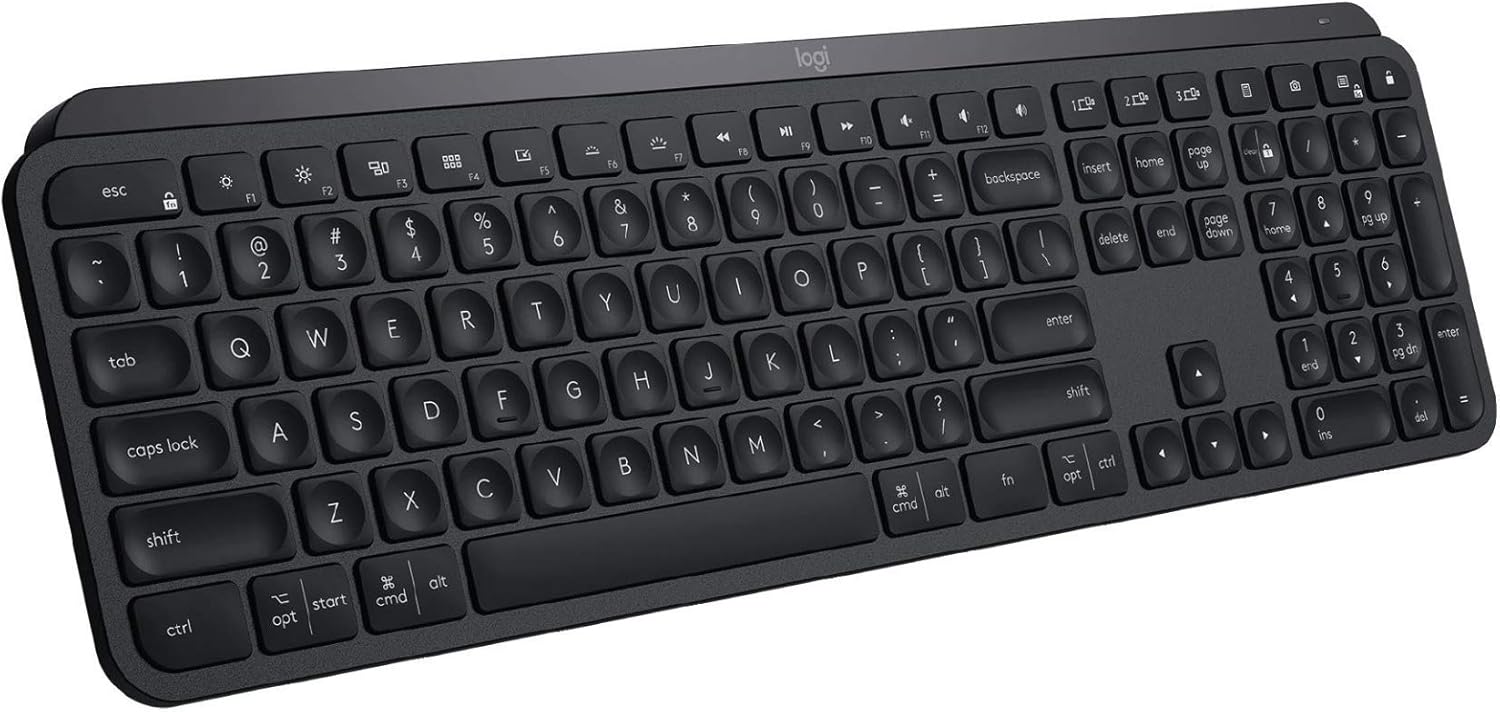
Logitech MX Keys Mini
Best Premium Compact
The MX Keys Mini brings premium keyboard feel to a travel-friendly size.
The MX Keys Mini brings premium keyboard feel to a travel-friendly size. The low-profile keys have satisfying tactile feedback without excessive travel. Backlighting adjusts to ambient light automatically. USB-C charging delivers 10 days per charge (5 months with backlight off). Smart Functions row adapts to your active app. If you type for hours daily and refuse to compromise on feel, this is the keyboard.
What We Like
❝Worth every penny for the typing feel. The backlighting in dim cafés is clutch. Still my favorite after two years.❞
Logitech MX Anywhere 3S - Best Travel Mouse

The MX Anywhere 3S is purpose-built for mobile work. The 8K DPI sensor tracks on any surface—glass, marble, fabric. Quiet clicks won't disturb café neighbors. USB-C quick charge gives 3 hours use from 1 minute charging. MagSpeed wheel scrolls 1,000 lines per second for long documents. Connect to three devices and switch with a button. At 3.5 oz, it disappears into any bag.
What We Like
❝Works on literally every surface I've tried. The quiet clicks are essential for café work. Best travel mouse I've owned.❞
Logitech Pebble 2 - Best Budget Mouse

Logitech Pebble 2
Best Budget Mouse
The Pebble 2 delivers solid performance at a fraction of premium mouse prices.
The Pebble 2 delivers solid performance at a fraction of premium mouse prices. The slim profile slides into any pocket. Silent clicks won't disturb anyone. Bluetooth and USB receiver options for maximum compatibility. Three device switching at this price point is impressive. Battery life stretches to 24 months on a single AA. For nomads who need a reliable mouse without spending $80, this is it.
What We Like
❝Can't believe how good this is for $25. Silent, portable, and the battery lasts forever.❞
Apple Magic Keyboard - Best for MacBook Users

Apple Magic Keyboard
Best for MacBook Users
If you're deep in the Apple ecosystem, the Magic Keyboard provides seamless integration.
If you're deep in the Apple ecosystem, the Magic Keyboard provides seamless integration. Touch ID works with compatible Macs for quick authentication. The scissor mechanism matches MacBook key feel exactly. Rechargeable battery lasts about a month per charge. The aluminum construction feels premium and matches MacBook aesthetics. Not the most portable option, but unbeatable for Mac-centric workflows.
What We Like
❝Touch ID on an external keyboard is a game-changer. Seamless with my MacBook Pro.❞
Keychron K3 - Best Mechanical Travel Keyboard

Keychron K3 Ultra-Slim
Keychron K3 Best Mechanical Travel Keyboard
Mechanical keyboard fans don't have to sacrifice their favorite switches while traveling.
Mechanical keyboard fans don't have to sacrifice their favorite switches while traveling. The K3's ultra-slim profile packs genuine mechanical switches into a portable form factor. Choose from Gateron low-profile switches (red, blue, brown) for your preferred feel. RGB backlighting, USB-C charging, and Mac/Windows compatibility. The aluminum frame adds premium feel without excessive weight. Not as compact as membrane options but delivers real mechanical satisfaction.
What We Like
❝Finally a mechanical keyboard I can actually travel with. The brown switches feel amazing.❞
Review of Our Favorite 3
Best Overall Travel Keyboard
The K380 hits the perfect balance for nomads: compact size, excellent typing feel, multi-device switching, and remarkable battery life.
Best Premium Compact
The MX Keys Mini brings premium keyboard feel to a travel-friendly size.
Best Travel Mouse
The MX Anywhere 3S is purpose-built for mobile work.
About the Author