Best Portable Power Stations for Remote Work (2026)

- Anker SOLIX C300 Portable Power Station - Best Overall Power Station for Remote Work
- BLUETTI Elite 30 V2 Portable Power Station - Best Value Power Station for Laptops
- Jackery Explorer 300 Portable Power Station - Most Portable Power Station for Nomads
- Arkpax Core 300W Portable Power Station - Best Budget Power Station for Remote Work
- Jackery Explorer 1000 v2 Portable Power Station - Best Power Station for Van Life
- Anker SOLIX S2000 Portable Power Station - Best Basecamp Power Station for Off-Grid Work
The best portable power station for remote work in 2026 is the Anker SOLIX C300: 288Wh of LiFePO4 capacity, two 140W USB-C ports, and an 80% recharge in about 50 minutes. That is enough to run a typical laptop through a full workday and top itself back up over a lunch stop. Need more? The Jackery Explorer 1000 v2 covers a laptop plus Starlink all day with room to spare.
This article contains affiliate links — as an Amazon Associate, we earn from qualifying purchases at no extra cost to you.
A power station is one half of a working off-grid kit; connectivity is the other. This guide pairs with our full off-grid internet and power setup, which covers the whole system. Here, we focus on one question: which battery keeps your laptop and internet connection alive from 9 to 5, and how big does it actually need to be?
Our Six Picks at a Glance
- Best Overall: Anker SOLIX C300 — fastest recharge and best ports in the workday class
- Best Value: BLUETTI Elite 30 V2 — 600W output and a UPS mode for less money
- Most Portable: Jackery Explorer 300 — 7.5 lbs, the lightest full workday battery here
- Best Budget: Arkpax Core 300W — pure sine wave AC and UPS for around 110 dollars as of July 2026
- Best for Van Life: Jackery Explorer 1000 v2 — laptop plus Starlink, all day, every day
- Best Basecamp: Anker SOLIX S2000 — 2,010Wh and a 10,000-cycle battery for a fixed off-grid base
Every pick uses LiFePO4 (LFP) battery chemistry. That is deliberate, and we explain why below.
Power Station vs. Power Bank for Working Off Grid
If you already own a big USB-C power bank, you may not need a power station at all. We break down that decision in our guide to choosing the biggest power bank for your phone and laptop, but the short version is this: a power bank charges USB devices, while a power station adds AC outlets, far more capacity, and pass-through UPS behavior — the things you need to run a router, a monitor, a Starlink dish, or a laptop charger that only speaks AC.
There is one hard constraint that decides this for many nomads: flying. According to the FAA's PackSafe rules for airline passengers, lithium batteries up to 100Wh fly in carry-on without approval, batteries from 101-160Wh need airline approval, and anything over 160Wh is forbidden on passenger aircraft. Spare lithium batteries must always travel in carry-on, never checked. Every power station in this guide — even the smallest at 192Wh — is over that 160Wh ceiling.
So be honest about your travel style:
- Fly-first nomads: stick to a sub-100Wh power bank and skip this category — see our guide to running Starlink Mini from a power bank for the watt-hour math.
- Road, rail, van, and basecamp nomads: a power station is the right tool, and the rest of this article is for you.
How to Size a Portable Power Station for a Laptop Workday
Sizing a portable power station for a laptop is arithmetic, not guesswork. You need three numbers: what your gear draws, how long you work, and how much of the battery's rated capacity you can actually use.
What a laptop draws. According to Anker's laptop power guide, a typical laptop consumes 30-90W when plugged in, with a standard 14-15-inch model averaging around 60W. BLUETTI's laptop power guide puts typical use — browsing, streaming, spreadsheets — at 30-100W depending on the machine. For planning a writing-and-calls workday, we budget 40W average; heavy compiles, exports, or long video calls push that higher.
What your internet draws. A phone hotspot or dedicated 4G/5G router adds comparatively little — see our portable WiFi hotspot guide for that setup. Satellite is the big variable: Starlink's official spec for the Mini averages 20-40W, and GridWright's field measurements show roughly 20-25W in idle use and 25-35W in mixed work, rising to 35-40W during heavy uploads and video calls, with a 30W planning average for off-grid budgeting. Our Starlink Mini review covers how it performs as a work connection.
What you can actually use. Rated watt-hours are not delivered watt-hours. Allwei's runtime guide puts real-world usable output at about 80-90% of rated capacity once inverter and conversion losses stack up — a 1,000Wh station yields roughly 850Wh at the outlet — while Portable Energy Lab notes that DC and USB-C outputs bypass the AC inverter and convert at roughly 90-98% efficiency. Practical takeaway: charge your laptop over USB-C, not through its AC brick, and you keep roughly an extra 10% of your battery.
Put together, the workday math looks like this:
- Laptop-only day: 40W x 8 hours = 320Wh at the laptop, or about 335Wh from the battery over USB-C. A 288-292Wh station covers roughly seven hours of continuous draw — and since your laptop's internal battery handles the remainder, that is a full workday. This is exactly why the 288Wh class dominates our list.
- Laptop + Starlink Mini day: 320Wh + (30W x 8 hours = 240Wh) is 560Wh, call it 600-620Wh after conversion losses. The 1,070Wh Jackery Explorer 1000 v2 covers that with roughly 40% margin for phone, lights, and a fan.
- Multi-day basecamp: double the above and add a 12V fridge or evening loads, and you are in 2kWh territory — the Anker SOLIX S2000's domain.
The Best Portable Power Stations for Remote Work in 2026
Anker SOLIX C300 — Best Overall
The C300 wins because it fits the actual rhythm of a remote workday better than anything else in its class. Its two 140W USB-C ports are two-way: the same cable that fast-charges your laptop at full speed also recharges the station itself, so you can top it up from any USB-C PD source without carrying a brick. Wall charging is the headline, though — 80% in about 50 minutes means a coffee stop or a co-working drop-in fully rearms your power for the next off-grid session.
At 288Wh it delivers the full laptop workday we calculated above, and the three AC outlets (300W total) handle a monitor, camera light, or whatever charger refuses to speak USB-C. It runs at 25dB — effectively silent on calls — and the LiFePO4 pack is rated for 3,000 cycles and a roughly 10-year design life, backed by a 5-year warranty. One caveat from the spec sheet: solar input works with Anker's 100W/60W panels but not the PS30/PS200/PS400 models, so check compatibility before buying panels.
At 269.99 dollars as of July 2026, this is the default answer for most remote workers: one unit, one workday, one fast recharge.
BLUETTI Elite 30 V2 — Best Value
Same 288Wh capacity as the C300, about 30 dollars cheaper as of July 2026, and it actually beats our top pick in two places. First, output: 600W continuous (with a 1,500W surge mode) is double the C300's AC headroom, which matters the day you need to run a projector, a soldering iron, or a travel kettle alongside the laptop. Second, the 10ms UPS switchover: leave your router and laptop plugged through it at your apartment or van, and a grid outage never interrupts a client call. For nomads based in outage-prone regions, that alone justifies the purchase.
Charging is nearly as quick as the Anker — 380W input takes it from 0-80% in 45 minutes and to full in 70 — and standby drain is a low 4.5W, so the charge you banked on Monday is still there on Thursday. At 9.4 lbs it slips into a tote or backpack outer pocket. The trade-off versus the C300 is small but real: its second USB-C port tops out at 100W against the Anker's two 140W lanes, which is why it takes the value slot rather than the crown.
Jackery Explorer 300 — Most Portable
At 7.5 lbs — 17% lighter than the industry average, per Jackery — the Explorer 300 is the pick for nomads who relocate constantly and count every pound. You still get the full 292Wh laptop-day capacity, a 100W USB-C PD port for efficient laptop charging, two AC outlets, and a 120W car outlet for 12V gear.
What the user consensus gets right is that this is a small-electronics specialist: laptops, phones, camera batteries, a router — not kettles or hot plates, which its 300W output cannot run. As a remote worker, that limitation barely matters; your job runs on exactly the loads it handles best. The LiFePO4 pack is rated for 4,000+ cycles to 70% capacity, roughly 11 years of workdays, and pairing it with Jackery's 100W panel gets it to 80% in about 2.8 hours of sun. At 198.99 dollars as of July 2026, it undercuts both picks above — choose it when weight beats wattage.
Arkpax Core 300W — Best Budget
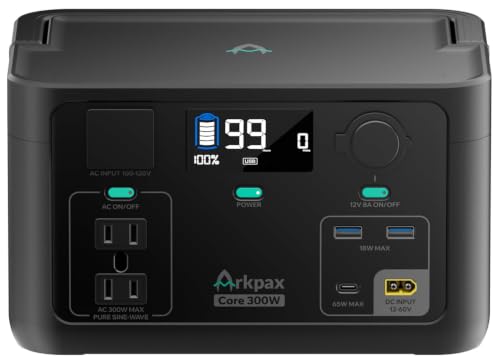
At 109.99 dollars as of July 2026, the Arkpax Core 300W costs less than half the C300 and still covers the essentials that matter for work: pure sine wave AC output (safe for laptop bricks and sensitive electronics), a 10ms UPS function for outage-proofing a desk, and LiFePO4 cells rated for 4,000+ cycles. The included 180W adapter takes it from 0-80% in about an hour, and a built-in MPPT controller means it is solar-ready when you add a panel later.
The compromise is capacity: 192Wh delivers roughly four and a half hours of our 40W laptop draw over its 65W USB-C port. Combined with your laptop's internal battery, that stretches to most of a workday — but not a heavy one. We recommend it in two situations: as a first power station to learn your real consumption before spending more, or as a dedicated outage bridge for nomads based somewhere with daily load-shedding, where it keeps a router and laptop alive through scheduled cuts for close to bus-fare money.
Jackery Explorer 1000 v2 — Best for Van Life
This is the unit our workday math points to once Starlink enters the picture: 1,070Wh covers a laptop plus a Starlink Mini for a full 8-hour day with roughly 40% left over for phones, lights, and a fan. The 1,500W AC output (3,000W surge) also crosses the threshold where real appliances work — induction plates, coffee makers, power tools — which is what separates van life from van camping.
The killer feature for daily use is charging speed: an app-enabled emergency mode refills 0-100% in one hour (the 1.7-hour default is gentler on the battery), so a single campground hookup or a long café stop resets your entire power budget. Van lifers in reviews consistently call the one-hour charge a game-changer for exactly this reason. At 23.8 lbs with a foldable handle, it moves between van, table, and beach without complaint. Two caveats: solar charging works only with Jackery's own panels, and at 459 dollars as of July 2026 (down from 799), it is priced like the serious tool it is — and a better cost-per-watt-hour than any of the smaller picks on this list.
Anker SOLIX S2000 — Best Basecamp
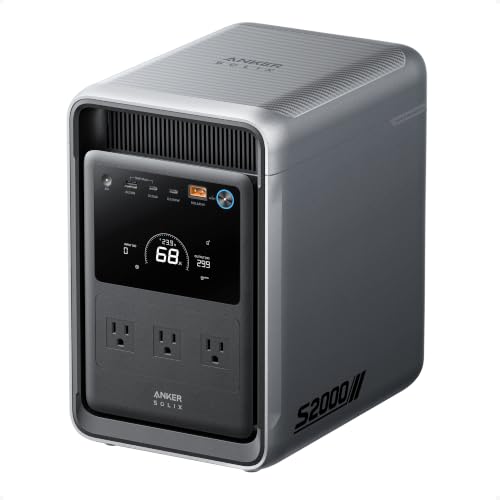
If you work from a fixed off-grid base — a cabin, a plot, a long-stay van setup — the S2000 changes the daily-recharge question into a weekly one. Its 2,010Wh pack runs our laptop-plus-Starlink workday nearly three times over, and independent testers ran a fridge and kitchen gear for more than 60 hours on a single charge. The 6W idle draw is the quiet spec that matters: a battery that feeds a router and dish around the clock cannot afford to waste 20W just being on.
The battery is the long-game argument. The 314Ah LFP cells are rated for 10,000 cycles and a roughly 15-year lifespan, so cycling it daily as your primary power source will not kill it. Sub-10ms UPS switchover makes it a whole-desk backup, six recharge paths include up to 400W of solar input for genuine off-grid autonomy, and at 35.7 lbs it is 30% smaller than the 2kWh industry average — luggable, though not something you carry daily. Note for van dwellers: there is no 12V DC port, so 12V fridges need an adapter. At 699.99 dollars as of July 2026 (down from 1,199), it is the biggest discount on the list.
Why a LiFePO4 Power Station Is the Right Call for Remote Work
Every unit above uses LiFePO4 (LFP) cells rather than the older NMC lithium-ion chemistry, and for a working battery that gets cycled almost daily, this is the most important spec on the sheet. According to WhichWatts' chemistry guide, a typical NMC battery is rated for 500-800 cycles before dropping to 80% capacity — under daily use, that is under two years — while LiFePO4 is rated for 3,000+ cycles, meaning daily charge-discharge for roughly a decade with 80% of original capacity remaining. The packs in this list range from 3,000 cycles (Anker C300) to 10,000 (SOLIX S2000).
There are two trade-offs. Weight: typical industry figures put NMC energy density at roughly 160-270 Wh/kg versus 100-180 Wh/kg for LiFePO4, so LFP units are heavier per watt-hour — the price of longevity. And that is fine here, because a work battery lives in a van or on a desk, not in a daypack. Safety is the second difference, and it cuts the other way: LiFePO4 cathodes bind oxygen tightly, making the chemistry far more resistant to thermal runaway than NMC — a genuine consideration for a battery that sleeps a meter from your head in a van.
One recharging note before you buy: pair whichever unit you choose with solar if you will be off hookups for more than a day or two. We are testing the best portable solar panels for a dedicated guide; until then, check panel compatibility carefully — both Jackerys and the Anker units have brand-specific restrictions noted above.
Which Power Station Should You Buy?
- You work from cafés, cars, campsites, and short off-grid stints: Anker SOLIX C300. Full workday, 50-minute recharge, done.
- You want the same capacity plus home-base UPS backup for less: BLUETTI Elite 30 V2.
- You move constantly and count grams: Jackery Explorer 300.
- You are budget-first or need an outage bridge: Arkpax Core 300W.
- You run Starlink from a van: Jackery Explorer 1000 v2. This is the one we would buy for full-time van life.
- You have a fixed off-grid base or want serious home backup: Anker SOLIX S2000.
Final Thoughts
The right power station is the one sized to your actual workday, not the biggest one you can afford. Run the math from this guide against your own gear: a laptop-only worker genuinely needs nothing more than 288Wh and a fast recharge, while a Starlink-dependent van lifer should start at 1kWh. Whichever you choose, the LiFePO4 chemistry across this list means the decision lasts a decade, not a season.
Power is only half the equation, though — a charged laptop with no signal is a very expensive notebook. Read our complete guide to off-grid internet for remote work to build the connectivity side, and see our complete remote work setup guide for the rest of the kit that turns anywhere into an office.
Anker SOLIX C300 Portable Power Station - Best Overall Power Station for Remote Work

Anker SOLIX C300 Portable Power Station
Best Overall Power Station for Remote Work
A 288Wh LiFePO4 power station with 300W output (600W surge) and eight ports, including two two-way 140W USB-C ports and three AC outlets.
A 288Wh LiFePO4 power station with 300W output (600W surge) and eight ports, including two two-way 140W USB-C ports and three AC outlets. It recharges to 80% in about 50 minutes from a wall outlet and also accepts solar, car, and USB-C PD 3.1 input. Rated for 3,000 cycles and a roughly 10-year design life with a 5-year warranty, it runs at a quiet 25dB and is 15% smaller than similar designs.
What We Like
❝Owners consistently describe the C300 as compact, reliable, and surprisingly capable, praising its dependable performance as a work-trip battery and small backup unit.❞
BLUETTI Elite 30 V2 Portable Power Station - Best Value Power Station for Laptops

BLUETTI Elite 30 V2 Portable Power Station
Best Value Power Station for Laptops
A 288Wh LiFePO4 power station with 600W continuous output and a 1,500W Power Lifting surge mode, weighing just 9.
A 288Wh LiFePO4 power station with 600W continuous output and a 1,500W Power Lifting surge mode, weighing just 9.4 lbs. Its 10ms UPS switchover keeps laptops and routers running through outages, and 380W wall charging takes it from 0-80% in 45 minutes (0-100% in 70 minutes). Low standby drain of 4.5W via UltraCell tech and smart cooling helps stretch every watt-hour, with eight charging modes including solar and car.
What We Like
❝Reviewers repeatedly call out how quietly it runs and charges, with one tester powering two laptops, a tablet, and a phone at once and still finishing with charge to spare.❞
Jackery Explorer 300 Portable Power Station - Most Portable Power Station for Nomads

Jackery Explorer 300 Portable Power Station
Most Portable Power Station for Nomads
A 292Wh LiFePO4 power station with 300W rated output (600W peak) that weighs only 7.
A 292Wh LiFePO4 power station with 300W rated output (600W peak) that weighs only 7.5 lbs, 17% lighter than the industry average. Six outputs include two AC outlets, a 100W USB-C PD port, two USB-A ports, and a 120W car port. The battery is rated for 4,000+ cycles to 70% capacity, roughly 11 years of use, and it reaches 80% in about 2.8 hours with Jackery's 100W solar panel.
What We Like
❝User feedback is overwhelmingly positive about its light weight, simple interface, and abundance of ports, with many calling it ideal for keeping a laptop and phone charged away from AC power.❞
Arkpax Core 300W Portable Power Station - Best Budget Power Station for Remote Work
Arkpax Core 300W Portable Power Station
Best Budget Power Station for Remote Work
A 192Wh LiFePO4 power station with 300W pure sine wave output (600W surge) at just 8.
A 192Wh LiFePO4 power station with 300W pure sine wave output (600W surge) at just 8.8 lbs. Six outputs cover two AC outlets, a 65W USB-C PD port, two USB-A ports, and a car outlet, and the included 180W AC adapter charges it 0-80% in about an hour. A 10ms UPS function, a built-in MPPT solar controller (panel sold separately), a 4,000+ cycle battery, and a multi-mode LED light with SOS round out the package.
What We Like
❝Early reviews center on value for money, pointing to the pure sine wave AC output, fast wall charging, and light build as a lot of capability at a budget price.❞
Jackery Explorer 1000 v2 Portable Power Station - Best Power Station for Van Life

Jackery Explorer 1000 v2 Portable Power Station
Best Power Station for Van Life
A 1,070Wh LiFePO4 power station with 1,500W AC output (3,000W surge) that weighs 23.
A 1,070Wh LiFePO4 power station with 1,500W AC output (3,000W surge) that weighs 23.8 lbs and carries with a foldable handle. Seven outputs include three pure sine wave AC outlets, two 100W USB-C PD ports, a USB-A port, and a DC car port. An app-controlled emergency mode charges it 0-100% in one hour (1.7 hours default to protect battery health), and the LFP battery keeps over 70% capacity after 4,000 cycles, roughly 10+ years. Solar charging works only with Jackery panels.
What We Like
❝Van lifers call the one-hour fast charging a game-changer for daily use and praise the v2 for hitting the sweet spot: big enough to run real essentials, small enough to move and store easily.❞
Anker SOLIX S2000 Portable Power Station - Best Basecamp Power Station for Off-Grid Work
Anker SOLIX S2000 Portable Power Station
Best Basecamp Power Station for Off Grid Work
A 2,010Wh LFP power station built on 314Ah cells with 1,500W continuous output and 3,000W peak.
A 2,010Wh LFP power station built on 314Ah cells with 1,500W continuous output and 3,000W peak. The battery is rated for 10,000 cycles and a roughly 15-year lifespan, and at 35.7 lbs the unit is 30% smaller than the 2kWh industry average. Eight outlets sit front and rear (note: no 12V DC port), UPS switchover is under 10ms, and six recharge paths include up to 400W of solar input. Idle draw is just 6W, good for up to 35 hours of fridge backup.
What We Like
❝Testers report it kept a fridge and kitchen gear running for over 60 hours on a single charge, and highlight its unusually low idle drain and seamless UPS switchover.❞
Review of Our Favorite 3
Best Overall Power Station for Remote Work
A 288Wh LiFePO4 power station with 300W output (600W surge) and eight ports, including two two-way 140W USB-C ports and three AC outlets.
Best Value Power Station for Laptops
A 288Wh LiFePO4 power station with 600W continuous output and a 1,500W Power Lifting surge mode, weighing just 9.
Most Portable Power Station for Nomads
A 292Wh LiFePO4 power station with 300W rated output (600W peak) that weighs only 7.
About the Author